Are you tired of searching for videos before your home workout? How to decide on ‘the next one to do’|みっか@宅トレアプリ作ってます

You opened YouTube intending to do a home workout, but time slipped away while you were choosing a video. You opened a video you felt like you watched yesterday, only to start looking for another one. Don’t you ever get a little tired before you even start exercising?
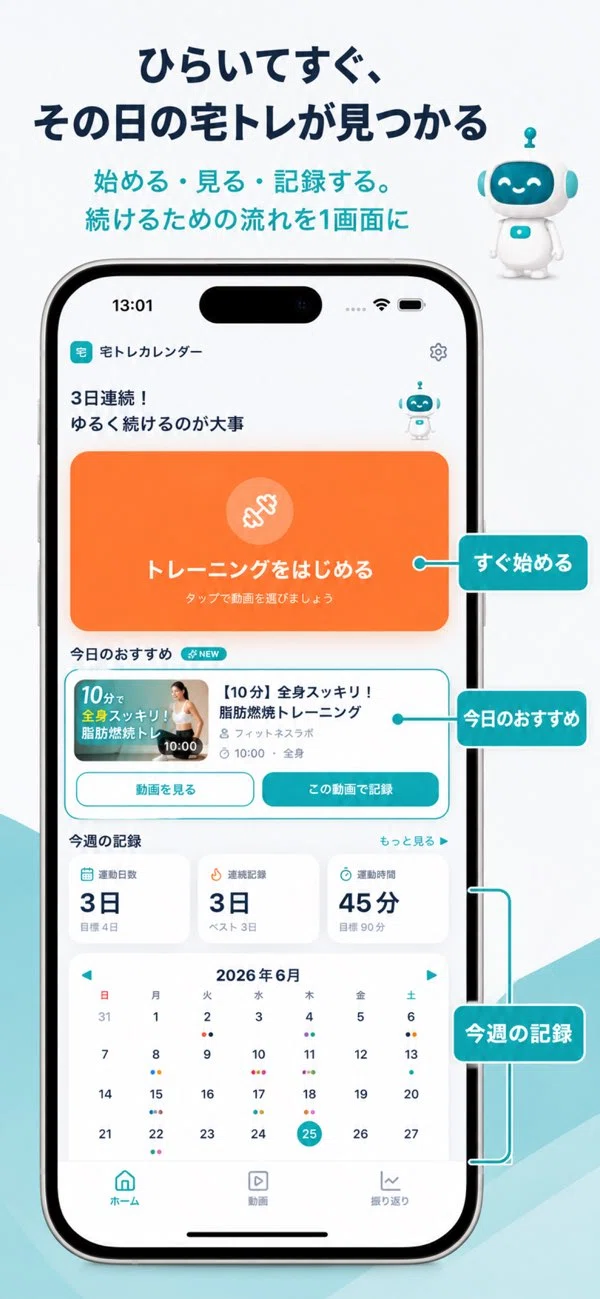
Hello, I’m Mikka. I’m creating a ‘Home Workout Calendar’ where you can save YouTube videos and record the exercises you’ve done. This time, rather than talking about the quality of the videos, I’d like to talk about organizing your favorite videos so you can open them again right away.
Separate where you save videos from where you choose them for today
If you keep saving every interesting video you find, the number of candidates to choose from later will grow. When ‘videos I want to do someday’ and ‘videos I can do today’ are listed in the same place, it becomes harder to choose, especially on days when you’re tired.
So, instead of searching through all your saved videos every time, try narrowing down your ‘candidates for next time.’ For example, one video for your usual routine, one for days when you want to keep it short, and one for stretching before bed. Starting with just these is enough.
Organize by usage scenario rather than by exercise type
While it’s convenient to organize by body part like ‘abs’ or ‘legs,’ when choosing a video, you’re also concerned about ‘how much time I have today.’ If you’re creating collections, you can also name them based on when you’ll open them, such as ‘Short videos,’ ‘Before bed,’ or ‘My usual routine.’
The Home Workout Calendar has a feature that lets you group saved videos into collections. Organize body parts with tags, and divide collections by usage scenario. By separating their roles like that, you increase the number of clues to find the same video.
After you finish a video, keep the next one ready
If you actually try it and think, ‘I want to do this again,’ keep it as a candidate for next time. Conversely, if a video was too long for you right now, remove it from today’s candidates. You don’t need to complete every video you’ve saved.
Will the version of me that exercises next time be able to avoid searching all over again?If you set that as your standard for organizing, you can focus on making it easy to find a single video rather than just making your folders look neat.
The preparation you can do today is to decide on one favorite video. The next time you open YouTube, don’t start by searching; try opening that one video instead.
For those who want to combine saving videos and recording workouts: The Home Workout Calendar is free to use with optional in-app purchases and is available for iPhone and iPad.